Platform introduction:
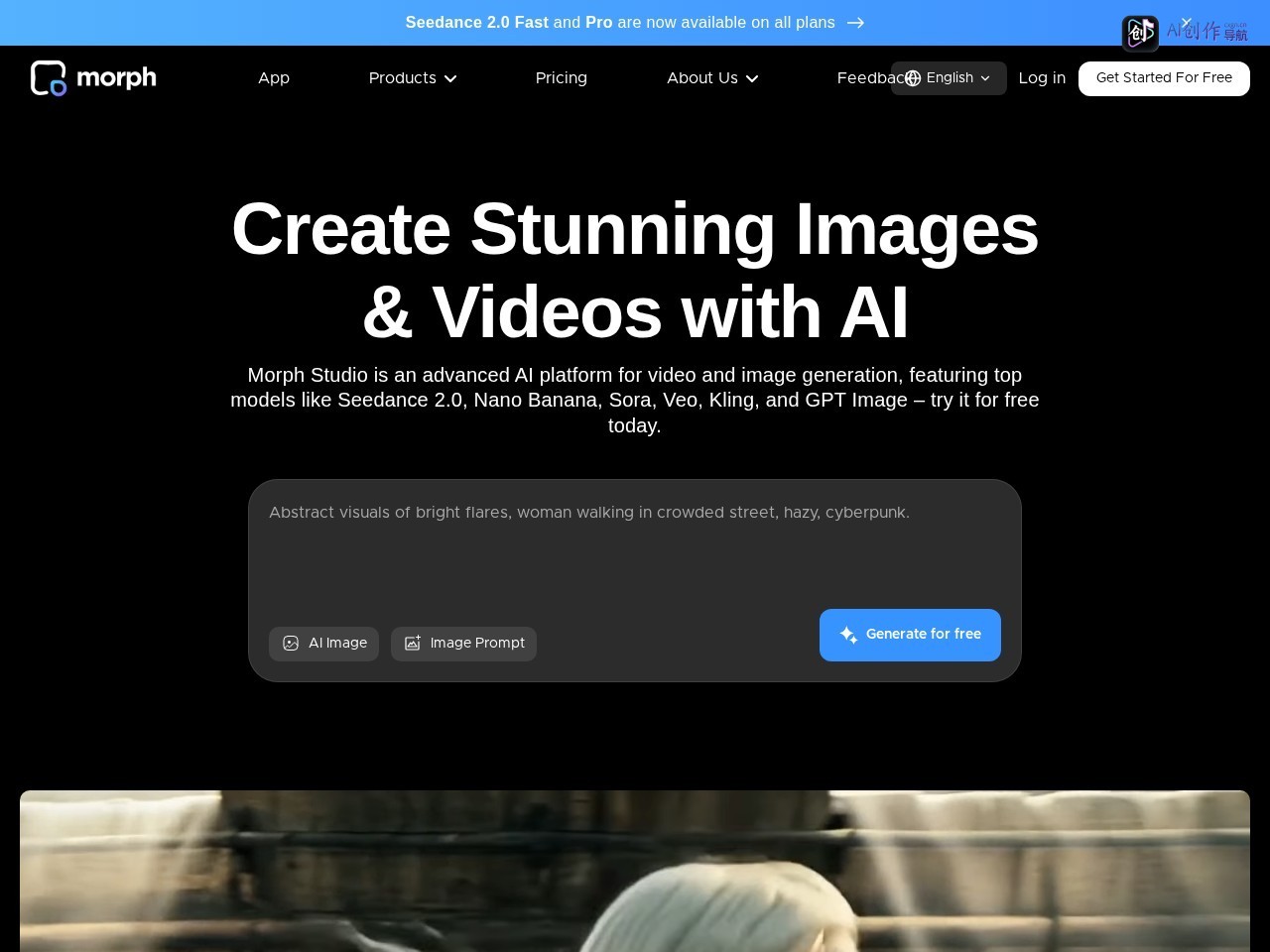
Morph StudioIt is a "zero-threshold professional creative tool" created for "global AI artists, independent filmmakers, advertising creative teams, game developers, and design enthusiasts". It solves four types of creative pain points: Inefficiency : Traditional video production requires "write scripts-shoot materials-cut videos-match audio". Cross-tool operations take several hours and the creative implementation cycle is long; The threshold is too high : Professional software (such as AE and Blender) needs to master complex parameters, making it difficult for non-professional users to achieve "mirror movement control and unified style";* Creative fault : Multi-modal tools (graphics, Wensheng videos) are scattered and need to be repeatedly exported and imported, interrupting the creative flow; The cost is high : Commercial-grade video style customization (such as pixel painting and Ghibli style) needs to be outsourced, with a single cost exceeding 100 yuan, which makes it heavy for small and medium-sized creators.
Its core logic is to "reconstruct the creative process with 'full-stack integration + fine control'": no professional skills, text/image input can generate video; no need to switch across tools," creation-generation-optimization "is completed in one stop; No need to compromise quality, integrate cutting-edge models to achieve film-level effects; Without high costs, free testing covers basic needs, allowing "professional-level creativity" to shift from "exclusive to a few" to "daily expression that everyone can quickly implement", adapting to all levels of needs from personal social content to commercial commercials.
Core functions: (Based on "Creation-Generation-Optimization" process disassembly)
1. Core: Four major multimodal generation capabilities
(1) Multi-mode content generation: covering all requirements from static to dynamic
Solve the problem of "single creative form and scattered tools" and adapt to full-scene creation:
- Text-to-Image : Enter a text description (such as "Fractal plants grow slowly, neon powder blue and green glows, symmetrically distorted" and "hemp trichomes under the microscope, high-definition black background, displaying terpene capsules"), AI generates high-detail still images, which can be directly used as video material or design reference. An illustrator uses this function to create concept maps of game scenes, which is 300% more efficient than hand-painted;
- Text-to-Video : Enter text commands (including scenes, actions, and styles), such as "medieval knights are standing in the sun in armor, and the aerial camera is slowly pulled out", and AI will automatically generate 1080P video (The default is 3 seconds, which can be extended to 7 seconds with the "-s7" command). It supports movie-level lens languages such as "time-lapse photography and aerial photography". Independent filmmakers use this function to quickly generate storyboards, and the creative verification time is reduced from 1 day to 10 minutes;
- Image-to-Video : Upload still images (such as character illustrations, product design drawings), AI gives dynamic effects (such as "character walking, product rotation, scene extension"), and supports controlling "motion amplitude (MOTION 1-10, the larger the value, the more intense the action)". An e-commerce company used this function to turn a product map into a "360° rotation display video", increasing the product click rate by 40%;
- Video Style Transfer : Upload existing videos and convert them into styles such as "pixel painting, 2D animation, Ghibli, cyberpunk" with one click, retaining the original video's movements and rhythm, and only replacing them. Visual texture, a creator used this function to turn a real-shot vlog into "pixel animation", and the social interaction rate was 50% higher than the original video.
(2) Professional level fine control: master everything from parameters to mirror operation
Solve the problem of "AI generation is uncontrollable and lacks professionalism" and adapt to professional needs:
- Lens movement and lens control : Provide four basic lens movement types: "Zoom, pan (up, down, left and right), rotation (clockwise/counterclockwise), and still lens". Support the addition of technical terms such as "aerial shot" and timelapse "to the prompts. AI accurately generates the corresponding lens language. An advertising team used the command" aerial lens + cyberpunk style "to generate a car promotional short film, with a picture texture comparable to real shots;
- Dynamic and frame rate adjustment :
- MOTION function: Level 1-10 motion amplitude control (Level 1 subtle smoothness, Level 10 exaggerated and intense), adapting to "natural scenes (low MOTION)" and "animation special effects (high MOTION)";
- Frame rate (FPS): 8-30 frames are adjustable (default 24 frames), 30 frames generate the smoothest video (larger file size), and 8 frames are suitable for retro animation style. An animator uses "12 frames + low MOTION" to create retro cartoon clips, restoring the texture of the 1980s;
- Customization of video parameters : Supports 5 video ratios (suitable for Douyin/YouTube/poster and other scenes), 1080P HD output, and the duration can be accurately controlled through instructions (such as "-s7" to generate 7-second video) to avoid "fixed duration, incompatible proportion" problem.
(3) Synchronization of sound and picture and rendering of atmosphere: Farewell to "mime" videos
Solve the problem of "disconnect between audio and picture and insufficient atmosphere" and adapt immersive content:
- Integrate Google DeepMind's Veo3 model to achieve "native synchronous generation of video-audio": without post-dubbing, AI automatically generates "character dialogue, action sound effects (such as snow creaking, stir-frying sound), environmental sound", and the mouth shape is accurately aligned with the dialogue (such as "Two muffins are talking in the oven, the mouth shape matches the rhythm of the lines"), and the action and sound effects are synchronized (such as "the drummer's hit completely coincides with the drum beat");
- Application scenario: A creator used this function to generate a video of "1980s retro cooking show". The host's dialogue, the collision of kitchen utensils, and the background music were natively synchronized. No additional editing was needed, and the production time was reduced from 2 hours to 5 minutes.
(4) Storyboard creation and ecological integration: improving creative continuity
Solve the problem of "multi-lens logic is confusing and collaboration is difficult" and adapt to long content production:
- Storyboard generation : Supports video generation according to "shot sequence". Each shot can be independently set "lens movement, style, and duration". AI automatically maintains the consistency of "character image and scene style"(such as reproducing the famous scene of Ghibli version of "Legend of Zhen Huan", 6 shots are logically consistent). A team used this function to create a 60-second short film, and the lens connection efficiency was 80% higher than that of a single shot;
- Tool ecological linkage : It can be cooperated with AI tools such as GPT-4o (such as using GPT-4o to write scripts and Morph to generate videos) to support exporting materials to professional software such as Blender and Pr. For secondary optimization, at the same time, through the Discord community Get "prompt word templates and user cases", novices can quickly reproduce high-quality effects (such as "Using Morph to generate rap videos" and "Making game animation clips").
applicable population
- AI artists/independent creators : The core requirement is to "achieve creative implementation at low cost"(such as stylized Short Video and conceptual art), rely on "free testing + cultural videos", and the core uses "style transfer, mirror movement control" to adapt to content creation on platforms such as Douyin and Instagram;
- Advertising creative team : The core requirement is to "quickly verify concept"(such as brand advertising clips and product style testing), choose "commercial professional edition + batch generation", and the core use of "audio and picture synchronization, storyboard creation" to help Customers quickly confirm the plan and increase the efficiency of negotiating orders by 50%(user feedback that "displaying concepts is 3 times faster than traditional PPT");
- Film and television/game developers : The core requirement is to "make storyboards/concept scenes"(such as movie split shots and game animations), rely on "Veo 3 sound and picture synchronization, picture consistency", and the core uses "multi-lens sequence generation, high-definition output", shortening the early creation cycle;
- Design enthusiasts/students : The core requirement is to "try professional creativity at zero threshold"(such as pixel painting videos, cartoon clips), and explore functions through free tests (Discord access) without worrying about equipment and skill limitations.
Core advantages (compared to similar tools)
- Leading the picture consistency and accuracy : Rated as "Runway's strongest competitor" in the industry, the generated content is "logically consistent and unified in style", and the degree of restoration of detailed instructions (such as "fractal symmetry, metallic texture") is higher than that of similar tools. A test showed that "under the same prompt, Morph generated 30% more light and shadow details of knight armor than Runway";
- Professional level control granularity : The only zero-threshold tool that simultaneously supports "lens customization, MOTION grading, and frame rate adjustment". Non-professional users can also implement "film-level lens language" to avoid "uncontrollable AI generation" problem;
- Leading edge model integration : It is the first to connect to Veo3 to synchronize sound and picture, natively generate "dialogue + sound effects + mouth alignment", which is 200% more efficient than tools that require post-dubbing, and supports "reference videos to maintain style/role consistency";
- Free and low threshold : Through Discord's free open test, no credit card is needed, novices can start in 5 minutes. It also provides "prompt word templates and user cases" to reduce the cost of creative trial and error;
- Community ecology is active : The Discord community gathers 100,000 + creators to share "creative skills and effect optimization experience" in real time, support collaborative feedback, and creative iteration speed is 50% faster than using independent tools.
precautions
- Free test access : You need to obtain the invitation code through the Discord community (link: https://discord.com/invite/2ffQj2UmSP). It is open for a limited time. It is recommended to register as soon as possible;
- Copyright usage specifications : The content generated during the free test period is recommended for non-commercial scenarios (personal sharing, creative display). Commercial use requires a paid version to obtain authorization to avoid infringement;
- Rational expectation of effects : After complex multi-role interactions (such as long shots of multi-person conversations) are generated, it is recommended to manually fine-tune the "shot order and sound sound volume". AI can ensure the basic quality, and refined optimization needs to be combined with professional software;
- Model ability limitations : The current maximum generation time is 7 seconds (Veo 3 only 8 seconds), and long videos need to be generated in separate shots and then spliced; some extreme styles (such as ultra-realistic portraits) may have detail deviations, so it is recommended to use the "Reference Image" function optimization;
- Utilization of community resources : There are a large number of "prompt word cases (such as 'generating rap videos' and 'retro cooking programs')" in the Discord community. Newbies can refer to the reproduction effect to reduce trial and error time.
Disclaimer: Tool information is based on public sources for reference only. Use of third-party tools is at your own risk. See full disclaimer for details.